Wednesday, 21 May 2008

Using Regular Expression To Resolve Multiple Issues

One way to resolve issues which occur too many times to fix by hand in the generation script is to use a regular expression to search and replace some problematic code.

Shiva Ramakrishnan provided these regular expressions
\(['][A-Za-z_ ]*\)& ----------------à \1'||chr(38)||'


\(['][A-Za-z_ ]*\)& \([A-Za-z_ ]*[']\)--------------------------à \1'||chr(38)||'\2


\(raw(\)\([0-9]*\)\() default 0\) ----------------------------------à \1\2) default '0'


\('12/31/9999'\) -------------------------------------------à to_date(\1,'mm/dd/yyyy')


CAST('9999-12-31' AS DATE) ----------àto_date(‘12/31/9999’,’mm/dd/yyyy’)

  • First one is replacing ‘&’ with CHR(38). SQLPLUS provides mechanism to overlook this. So this is not a major concern.
  • The second one is where RAW datatypes are assigned DEFAULT 0. I am reassigning with DEFAULT ‘0’
  • The third is a case of DATE Fields assigned as is. I think NLS_DATE parameters can be SET to overlook this. I am doing a global replacement.
Hope to have these automatically fixed soon.

Captured And Converted Indexes Report

Heres a little SQL Developer user defined report to list the captured and converted indexes. You can change the query to list 1 or the other.

Copy the following text and create a file called MigratedIndexes.xml with it.
The In the SQL Developer User Defined Reports , Import the file. When you open the report you should choose the migration repository.


<?xml version="1.0" encoding="UTF-8" ?><displays><display id="0b9c6f78-011a-1000-8001-0aa970396f91" type="" style="Table" enable="true">
<name><![CDATA[List Captured And Converted Indexes]]></name>
<description><![CDATA[List Captured And Converted Indexes]]></description>
<tooltip><![CDATA[List Captured And Converted Indexes]]></tooltip>
<drillclass><![CDATA[null]]></drillclass>
<CustomValues>
<TYPE>horizontal</TYPE>
</CustomValues>
<query>
<sql><![CDATA[SELECT DISTINCT NVL(c.type, 'captured') type, t.project_name, t.catalog_name, t.schema_name, t.table_name, i.index_name, i.index_type
FROM md_indexes i, mgv_all_tables t, md_connections c
WHERE i.table_id_fk = t.table_id AND c.id = t.connection_id

ORDER BY type, t.project_name, t.catalog_name, t.schema_name, t.table_name, i.index_name]]></sql>
</query>
</display>
</displays>

Tuesday, 20 May 2008

Parameters Of A Procedure Call

**Update: This is now fixed in SQL Developer 1.5.1**
A SQL Server and Sybase translation issue.
If you executed a procedure from another procedure, and you specified the executed procedure parameter names, you may have got a doubling up of param names.

T-SQL Example
create procedure procparam1 @param1 int, @param2 int
as
select @param1, @param2
go


create procedure procparam2 @param1 int
as
declare @var1 int
begin
select @var1 = 10
execute procparam1 @param1=@param1,@param2=@var1

execute procparam1 @param1,@var1

execute procparam1 @param1=1,@param2=2

execute procparam1 1,2
end
go


Generated PL/SQL
CREATE OR REPLACE PROCEDURE procparam2
(
v_param1 IN NUMBER DEFAULT NULL ,
cv_1 IN OUT SYS_REFCURSOR,
cv_2 IN OUT SYS_REFCURSOR,
cv_3 IN OUT SYS_REFCURSOR,
cv_4 IN OUT SYS_REFCURSOR
)
AS
v_var1 NUMBER(10,0);
BEGIN

BEGIN
v_var1 := 10;

procparam1(v_param1v_param1 => v_param1,
v_param2v_param2 => v_var1,
cv_1 => cv_1);

procparam1(v_param1,
v_var1,
cv_1 => cv_2);

procparam1(v_param1v_param1 => 1,
v_param2v_param2 => 2,
cv_1 => cv_3);

procparam1(1,
2,
cv_1 => cv_4);

END;
END;
Note the v_param1v_param1 .

A real fix will be included in SQL Dev 1.5.1, but if you cant wait heres a hack.

  • Close SQL Developer
  • Backup your \sqldeveloper\extensions\ oracle.sqldeveloper.migration.translation.sqlserver.jar
  • Extract \sqldeveloper\extensions\oracle.sqldeveloper.migration.translation.sqlserver.jar:templates\tsql.stg
  • Including its directory structure to C:\
  • Edit the "templates\tsql.stg" file
  • Use the "first" method around the paramName, so only 1 paramName is used
TSQL_executeProcedureParam(paramName, paramValue) ::=<<
<if(paramName)><first(paramName)> =\> <paramValue>
<else><paramValue>
<endif>
>>
  • Delete the exising templates\tsql.stg from the jar file, and add the modified one back in, including directory structure, so the jar file has a templates\tsql.stg
  • Restart SQL Developer and convert again.

Sybase Offline Capture Scripts on Windows

**Update: This is now fixed in SQL Developer 1.5.1**
Sybase Offline Capture Scripts on Windows are incorrect. Some files needs to replaced for them to work, the text of which can be found below.

You should then be able to perform an Offline Capture successfully.

SYBASE 15
SYB15_OFFLINE_CAPTURE.BAT username password databasename servername
For Example
SYB15_OFFLINE_CAPTURE.BAT sa "" pubs2 the4400.ie.oracle.com

SYBASE 12
SYB12_OFFLINE_CAPTURE.BAT username password databasename servername
For Example
SYB12_OFFLINE_CAPTURE.BAT sa "" pubs2 the4401.ie.oracle.com

Some Tips
  • "" represents an empty string for no password.
  • Sybase BCP, ISQL should be first on your PATH if you have SQL Server installed as well.
  • Example: SET PATH=D:\SybaseClient\OCS-15_0\bin;%PATH%
  • The Servername must be defined in your sql.ini file for BCP to work.


SYBASE 15 (ASE15)
Replace the following files
  • SYB15_OFFLINE_CAPTURE.BAT
  • SYB15_BCP_SCRIPT.BAT

SYB15_OFFLINE_CAPTURE.BAT
@echo off

rem ** SET THE VALUE FOR THE OFFLINE_CAPTURE_COLUMN_DELIMITER
rem ** echoed through bcp to COLUMN.TXT
set OFFLINE_CAPTURE_COLUMN_DELIMITER="<EOC>"

rem ** SET THE VALUE FOR THE OFFLINE_CAPTURE_ROW_DELIMITER
rem ** echoed through bcp to ROW.TXT
set OFFLINE_CAPTURE_ROW_DELIMITER="<EOR>"

rem ** SET THE SCRIPT VERSION ENVIRONMENT VARIABLE
set OMWB_SCRIPT_VERSION=15

rem ** SET THE VALUE FOR THE OMWB FILE ENVIRONMENT VARIABLE
set OMWB_SCRIPT_FILE=%3\%3_INFO.TXT

rem ** DISPLAY THE HELP PAGE IF THE USER REQUESTS IT

if "%1"=="-h" goto help
if "%1"=="help" goto help
if "%1"=="?" goto help
if "%1"=="-?" goto help


rem *** DISPLAY THE SCRIPT VERSION IF THE USER REQUESTS IT

if "%1"=="-ver" goto version
if "%1"=="version" goto version

rem *** CHECK THAT THREE PARAMETERS HAVE BEEN ENTERED
rem *** THE PASSWORD CAN BE "", SO WE DON't DO THE SAME CHECK FOR THAT

if "%1"=="" goto input_error
if "%3"=="" goto input_error
if "%4"=="" goto input_error

rem *** START THE EXECUTION OF THE SCRIPT INSTRUCTIONS

goto start

:start

rem ** CREATE THE OUTPUT DIRECTORIES

mkdir master
mkdir %3

rem *** CALL THE BCP SCRIPT TO CREATE THE METADATA FILES

call SYB15_BCP_SCRIPT.BAT %1 %2 %3 %4 %OFFLINE_CAPTURE_COLUMN_DELIMITER% %OFFLINE_CAPTURE_ROW_DELIMITER%

rem *** CHECK THAT ALL OF THE OUTPUT FILES HAVE BEEN CREATED

goto checkoutput


:help
echo -----------------------------------------------------------------------
echo --------------------- Oracle Migration Workbench ---------------------
echo --------------------- Release %OMWB_SCRIPT_VERSION% ---------------------
echo -----------------------------------------------------------------------
echo ---- This script will generate delimited flat files containing ----
echo ---- schema metadata from the database you wish to migrate. This ----
echo ---- script will envoke the Bulk Copy Program (BCP) that should be ----
echo ---- part of your Sybase install base. ----
echo ---- Please ensure that your path points to the version of BCP ----
echo ---- that is installed with the Sybase from which you wish ----
echo ---- to migrate. Your current path setting is listed below: ----
echo ----
PATH
echo ----
echo ----
echo ---- To run this script, enter the following command at the prompt ----
echo ----
echo ---- OMWB_OFFLINE_CAPTURE login_id password database_name server_name
echo ---- where,
echo ---- dba_login_id is a login id which has been granted db_datareader
echo ---- and view definition on database_name
echo ---- password is the password for the login id
echo ---- database_name is the name of the database you wish to capture
echo ---- server_name is the name of the server on which the database resides
echo ---- For example,
echo ---- OMWB_OFFLINE_CAPTURE sa sapwd employeeDB DEPT1_SERVER
echo ----
echo -----------------------------------------------------------------------
goto exit

:input_error
echo ---- ** Error executing the script
echo ----
echo ---- To run this script, enter the following command at the prompt ----
echo ----
echo ---- OMWB_OFFLINE_CAPTURE login_id password database_name server_name
echo ---- where,
echo ---- login_id is a login id which has been granted db_datareader
echo ---- and view definition on database_name
echo ---- password is the password for the login id
echo ---- database_name is the name of the database you wish to capture
echo ---- server_name is the name of the server on which the database resides
echo ---- For example,
echo ---- OMWB_OFFLINE_CAPTURE sa sapwd employeeDB DEPT1_SERVER
echo ----
echo -----------------------------------------------------------------------
goto exit


:version
echo -----------------------------------------------------------------------
echo ---- This is the Oracle Migration Workbench offline capture script
echo ---- version %OMWB_SCRIPT_VERSION% for Sybase 15
echo -----------------------------------------------------------------------
goto exit

:omwbfile
echo OMWB REPORT FOR %3 > %OMWB_SCRIPT_FILE%
echo ____________________________________________ >> %OMWB_SCRIPT_FILE%
echo * SCRIPT EXECUTION DATE AND TIME: >> %OMWB_SCRIPT_FILE%
date /t >> %OMWB_SCRIPT_FILE%
time /t >> %OMWB_SCRIPT_FILE%
echo - >> %OMWB_SCRIPT_FILE%
echo SYSTEM PROPERTIES >> %OMWB_SCRIPT_FILE%
echo _______________________ >> %OMWB_SCRIPT_FILE%
echo * PLATFORM VERSION: >> %OMWB_SCRIPT_FILE%
ver >> %OMWB_SCRIPT_FILE%
echo - >> %OMWB_SCRIPT_FILE%
echo * PLATFORM CODEPAGE: >> %OMWB_SCRIPT_FILE%
mode con codepage /sta >> %OMWB_SCRIPT_FILE%
echo - >> %OMWB_SCRIPT_FILE%
echo SOURCE DATABASE SERVER PROPERTIES >> %OMWB_SCRIPT_FILE%
echo __________________________________ >> %OMWB_SCRIPT_FILE%
echo * BCP VERSION: >> %OMWB_SCRIPT_FILE%
bcp -v >> %OMWB_SCRIPT_FILE%
echo - >> %OMWB_SCRIPT_FILE%
echo * DATABSE SERVER COLLATION AND VERSION: >> %OMWB_SCRIPT_FILE%
isql -U%1 -P%2 -S%4 -i%3 -i properties.sql >> %OMWB_SCRIPT_FILE%
echo - >> %OMWB_SCRIPT_FILE%
echo DIRECTORY LISTING for %3 >> %OMWB_SCRIPT_FILE%
echo __________________________________ >> %OMWB_SCRIPT_FILE%
dir %3 >> %OMWB_SCRIPT_FILE%
echo - >> %OMWB_SCRIPT_FILE%
echo DIRECTORY LISTING FOR MASTER >> %OMWB_SCRIPT_FILE%
echo _______________________________ >> %OMWB_SCRIPT_FILE%
dir master >> %OMWB_SCRIPT_FILE%
echo - >> %OMWB_SCRIPT_FILE%
echo ATTRIBUTES OF SCRIPT: >> %OMWB_SCRIPT_FILE%
echo _______________________ >> %OMWB_SCRIPT_FILE%
attrib SYB15_OFFLINE_CAPTURE.bat >> %OMWB_SCRIPT_FILE%
echo - >> %OMWB_SCRIPT_FILE%
echo CONTENTS OF EXECUTED SCRIPT >> %OMWB_SCRIPT_FILE%
echo ____________________________________ >> %OMWB_SCRIPT_FILE%
type SYB15_OFFLINE_CAPTURE.BAT >> %OMWB_SCRIPT_FILE%
echo - >> %OMWB_SCRIPT_FILE%
echo CONTENTS OF BCP SCRIPT >> %OMWB_SCRIPT_FILE%
echo ____________________________________ >> %OMWB_SCRIPT_FILE%
type SYB15_BCP_SCRIPT.BAT >> %OMWB_SCRIPT_FILE%
echo - >> %OMWB_SCRIPT_FILE%

echo ** END REPORT FOR %3 >> %OMWB_SCRIPT_FILE%

rem *** DISPLAY THE FINAL INSTRUCTIONS TO THE USER
goto finalinstructions


:checkoutput

rem *** CHECK THAT ALL DATABASE META FILES HAVE BEEN CREATED
if not exist %3\SYB12_SYSUSERS.dat echo ** ERROR %3\SYB12_SYSUSERS.dat has not been created. Please check the screen output and .err files to detect the problem. Execute the script again when the problem is fixed or contact your Oracle representative if the problem persists.
if not exist %3\SYB12_SYSOBJECTS.dat echo ** ERROR %3\SYB12_SYSOBJECTS.dat has not been created. Please check the screen output and .err files to detect the problem. Execute the script again when the problem is fixed or contact your Oracle representative if the problem persists.
if not exist %3\SYB12_SYSTYPES.dat echo ** ERROR %3\SYB12_SYSTYPES.dat has not been created. Please check the screen output and .err files to detect the problem. Execute the script again when the problem is fixed or contact your Oracle representative if the problem persists.
if not exist %3\SYB12_SYSCOLUMNS.dat echo ** ERROR %3\SYB12_SYSCOLUMNS.dat has not been created. Please check the screen output and .err files to detect the problem. Execute the script again when the problem is fixed or contact your Oracle representative if the problem persists.
if not exist %3\SYB12_SYSCOMMENTS.dat echo ** ERROR %3\SYB12_SYSCOMMENTS.dat has not been created. Please check the screen output and .err files to detect the problem. Execute the script again when the problem is fixed or contact your Oracle representative if the problem persists.
if not exist master\SYB12_SYSDATABASES.dat echo ** ERROR master\SYB12_SYSDATABASES.dat has not been created. Please check the screen output and .err files to detect the problem. Execute the script again when the problem is fixed or contact your Oracle representative if the problem persists.

rem *** CHECK THAT ALL MASTER META FILES HAVE BEEN CREATED


rem ** UPDATE THE OMWB FILE - THIS HOLDS SCRIPT AND PERTINENT SOURCE DATABASE SERVER INFO

goto omwbfile


:finalinstructions
echo **************************************************************************
echo ** The offline capture script has completed execution.
echo ** Please review the screen output and .err files (if any) in the output
echo ** directories for any irregularities. You may need to execute the
echo ** script again to resolve any irregularities.
echo **
echo ** Finally, please archive the directory containing the sybase15.ocp file.
echo ** This contains master and %3 directories (preserve the
echo ** directory structure in the archive) the ROW.TXT, the COLUMN.TXT, and the
echo ** sybase15.ocp file. Return the archive file to
echo ** your Oracle representative.
echo **************************************************************************
goto exit


:exit
rem ** REMOVE THE SCRIPT VERSION ENVIRONMENT VARIABLE
set OMWB_SCRIPT_VERSION=
rem ** REMOVE THE VALUE FOR THE OMWB FILE ENVIRONMENT VARIABLE
set OMWB_SCRIPT_FILE=
rem ** REMOVE THE VALUE FOR THE END OF ROW DELIMITER ENVIRONMENT VARIABLE
set OFFLINE_CAPTURE_ROW_DELIMITER=
rem ** REMOVE THE VALUE FOR THE END OF COLUMN ENVIRONMENT VARIABLE
set OFFLINE_CAPTURE_COLUMN_DELIMITER=


SYB15_BCP_SCRIPT.BAT
rem  %1 DBA login id
rem %2 password
rem %3 database name
rem %4 database server name
rem %5 end or column delimiter
rem %6 end of row delimiter


rem export the required system tables in the master database
bcp sysdatabases out master\SYB12_SYSDATABASES.dat -c -t "\t<EOC>\t" -r "\t<EOC>\t<EOR>\n" -U%1 -P%2 -S%4

rem export the required system tables in the database to be migrated

bcp %3.dbo.sysusers out %3\SYB12_SYSUSERS.dat -c -t "\t<EOC>\t" -r "\t<EOC>\t<EOR>\n" -U%1 -P%2 -S%4
bcp %3.dbo.sysobjects out %3\SYB12_SYSOBJECTS.dat -c -t "\t<EOC>\t" -r "\t<EOC>\t<EOR>\n" -U%1 -P%2 -S%4
bcp %3.dbo.systypes out %3\SYB12_SYSTYPES.dat -c -t "\t<EOC>\t" -r "\t<EOC>\t<EOR>\n" -U%1 -P%2 -S%4
bcp %3.dbo.syscolumns out %3\SYB12_SYSCOLUMNS.dat -c -t "\t<EOC>\t" -r "\t<EOC>\t<EOR>\n" -U%1 -P%2 -S%4
bcp %3.dbo.syscomments out %3\SYB12_SYSCOMMENTS.dat -c -t "\t<EOC>\t" -r "\t<EOC>\t<EOR>\n" -U%1 -P%2 -S%4
isql -U%1 -P%2 -D%3 -S%4 -b -i get_indexes.sql -o %3\SYB12_SYSINDEXES.dat
isql -U%1 -P%2 -D%3 -S%4 -b -w200 -i get_constraints.sql -o %3\SYB12_SYSCONSTRAINTS.dat


For SYBASE 12
Only 1 SYB12_BCP_SCRIPT.BAT needs to be updated with the following

SYB12_BCP_SCRIPT.BAT
rem  %1 DBA login id
rem %2 password
rem %3 database name
rem %4 database server name
rem %5 end or column delimiter
rem %6 end of row delimiter


rem export the required system tables in the master database
bcp sysdatabases out master\SYB12_SYSDATABASES.dat -c -t "\t<EOC>\t" -r "\t<EOC>\t<EOR>\n" -U%1 -P%2 -S%4

rem export the required system tables in the database to be migrated

bcp %3.dbo.sysusers out %3\SYB12_SYSUSERS.dat -c -t "\t<EOC>\t" -r "\t<EOC>\t<EOR>\n" -U%1 -P%2 -S%4
bcp %3.dbo.sysobjects out %3\SYB12_SYSOBJECTS.dat -c -t "\t<EOC>\t" -r "\t<EOC>\t<EOR>\n" -U%1 -P%2 -S%4
bcp %3.dbo.systypes out %3\SYB12_SYSTYPES.dat -c -t "\t<EOC>\t" -r "\t<EOC>\t<EOR>\n" -U%1 -P%2 -S%4
bcp %3.dbo.syscolumns out %3\SYB12_SYSCOLUMNS.dat -c -t "\t<EOC>\t" -r "\t<EOC>\t<EOR>\n" -U%1 -P%2 -S%4
bcp %3.dbo.syscomments out %3\SYB12_SYSCOMMENTS.dat -c -t "\t<EOC>\t" -r "\t<EOC>\t<EOR>\n" -U%1 -P%2 -S%4
isql -U%1 -P%2 -D%3 -S%4 -b -i get_indexes.sql -o %3\SYB12_SYSINDEXES.dat
isql -U%1 -P%2 -D%3 -S%4 -b -w200 -i get_constraints.sql -o %3\SYB12_SYSCONSTRAINTS.dat

Thursday, 15 May 2008

Manage Tablespaces

In the old OMWB we had a "Discover Tablespaces" feature, so that you could assign tables to existing tablespaces in your Oracle database, before generating your Database.

In SQL Developer you can do this in 3 ways.

  1. Change the generation script so that you specify a different default tablespace for the new schema and all its tables.
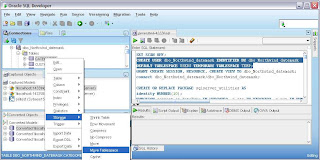
  2. Change a tables tablespace once in Oracle. Right click the table and choose Storage > Move Tablespace
  3. Write a script to automatically assign tables to different tablespaces depending on some criteria.
The first two options are show in this screen shot


But the third way may be the most useful.
If you wanted to have seperate tablespaces depending on the size of the tables you could run the following scripts on your Sybase/SQL Server database. The output of which can be run against your migrated Oracle database to move the tables to their new tablespaces. The best thing about this approach is you can do this before migrating the data, so that moving tablespaces is trivial.

SQL Server
SELECT CASE
WHEN num_rows >=100 THEN
'ALTER TABLE ' + TABLE_NAME +' MOVE TABLESPACE '+' BIGTABLESPACE ;'
WHEN num_rows <100 AND num_rows >=50 THEN
'ALTER TABLE ' + TABLE_NAME +' MOVE TABLESPACE '+' MEDIUMTABLESPACE ;'
WHEN num_rows <50 THEN
'ALTER TABLE ' + TABLE_NAME +' MOVE TABLESPACE '+' SMALLTABLESPACE ;' END SCRIPT
FROM (SELECT
Table_Name = so.name ,
NUM_ROWS = MAX(si.rows)
FROM
sysobjects so,
sysindexes si
WHERE
so.xtype = 'U'
AND
si.id = OBJECT_ID(so.name)
GROUP BY
so.name ) ALL_TABLES


Sybase
drop table TableRowCount
go

drop procedure populateTableRowCount
go

CREATE TABLE TableRowCount(table_name varchar(200),num_rows int)
go

create procedure populateTableRowCount as
begin
declare @tableName varchar(200)
declare @rowNum int
declare name_cursor cursor
for select name from sysobjects where type ='U' and name != 'TableRowCount'
for read only
CREATE TABLE #countSize(rowNum int)
open name_cursor
fetch name_cursor into @tableName
while @@sqlstatus = 0 -- ie no errors and we successfully fetched a row
begin
execute( 'insert into #countSize select count(*) rowNum from ' + @tableName)
select @rowNum = max(rowNum) from #countSize
delete from #countSize
insert into TableRowCount values(@tableName,@rowNum)
fetch next from name_cursor into @tableName
end
close name_cursor
deallocate cursor name_cursor
end
go

exec populateTableRowCount
go

SELECT CASE
WHEN num_rows >=100 THEN
'ALTER TABLE ' + table_name +' MOVE TABLESPACE '+' BIGTABLESPACE ;'
WHEN num_rows <100 AND num_rows >=50 THEN
'ALTER TABLE ' + table_name +' MOVE TABLESPACE '+' MEDIUMTABLESPACE ;'
WHEN num_rows <50 THEN
'ALTER TABLE ' + table_name +' MOVE TABLESPACE '+' SMALLTABLESPACE ;' END SCRIPT
FROM TableRowCount
go


Oracle : If you are already on Oracle and the data is present in your Oracle tables.

SELECT CASE
WHEN num_rows >=100 THEN
'ALTER TABLE ' || TABLE_NAME ||' MOVE TABLESPACE '||' BIGTABLESPACE ;'
WHEN num_rows <100 AND num_rows >=50 THEN
'ALTER TABLE ' || TABLE_NAME ||' MOVE TABLESPACE '||' MEDIUMTABLESPACE ;'
WHEN num_rows <50 THEN
'ALTER TABLE ' || TABLE_NAME ||' MOVE TABLESPACE '||' SMALLTABLESPACE ;' END SCRIPT
FROM ALL_TABLES
WHERE lower(owner) ='ownername'


The above scripts should generate another script like
SCRIPT
ALTER TABLE au_pix MOVE TABLESPACE SMALLTABLESPACE ;
ALTER TABLE authors MOVE TABLESPACE SMALLTABLESPACE ;
ALTER TABLE blurbs MOVE TABLESPACE SMALLTABLESPACE ;
ALTER TABLE discounts MOVE TABLESPACE SMALLTABLESPACE ;
ALTER TABLE publishers MOVE TABLESPACE SMALLTABLESPACE ;
ALTER TABLE roysched MOVE TABLESPACE MEDIUMTABLESPACE ;
ALTER TABLE sales MOVE TABLESPACE SMALLTABLESPACE ;
ALTER TABLE salesdetail MOVE TABLESPACE BIGTABLESPACE ;
ALTER TABLE skill MOVE TABLESPACE SMALLTABLESPACE ;
ALTER TABLE skill_detail MOVE TABLESPACE SMALLTABLESPACE ;
ALTER TABLE stores MOVE TABLESPACE SMALLTABLESPACE ;
ALTER TABLE table_emp MOVE TABLESPACE SMALLTABLESPACE ;
ALTER TABLE titleauthor MOVE TABLESPACE SMALLTABLESPACE ;
ALTER TABLE titles MOVE TABLESPACE SMALLTABLESPACE ;


Which when run in Oracle will move the tables to the correct tablespace. The above results are from Sybase pubs2 example database

Offline Blob Data Move

**Update: This is now set "on" by default in the preferences of SQL Developer 1.5.1**
In SQL Developer 1.5 we have a nifty solution for moving BLOBs (Images in SQL Server and Sybase) to Oracle offline.

The problem in the past was SQL Server and Sybase BCP tool dumps out binary values in HEX.
HEX cant be loaded easily into a BLOB in Oracle using SQL*Loader, there are some limitations to the size of the BLOB.

In the past we had a manual solution to create an extra CLOB column to load the HEX as a string/clob to . Then we had a procedure which was run after the datamove to convert the HEX to RAW piece by piece and insert it into the BLOB column. This is automated now but you have to set a preference first.

Select "Generate Stored Procedure to Migration Blobs Offline". In 1.5 by efault its off. Ill change this for 1.5.1 .


Now when you move your data offline, BLOBS will be handled automatically.

Search & Replace SQL within the Repository

Sometimes you'd like to go a do a quick string search and replace of SQL for your captured triggers, procedures, functions or views.
The DDL for these objects is held within different migration repository tables. You can create the following view within your migration repository and use it to update the underlying migration repository.

CREATE OR REPLACE VIEW MGV_ALL_CAPTURED_SQL AS
WITH
captured_schema AS
(SELECT SCHEMA_ID
FROM mgv_all_schema
WHERE connection_id IN
(SELECT ID FROM md_connections WHERE NVL(type,'Captured') != 'CONVERTED')),
captured_connections AS
(SELECT ID FROM md_connections WHERE NVL(type,'Captured') != 'CONVERTED') ,
captured_view_trigger AS
(SELECT v.trigger_id vt
FROM mgv_all_view_triggers v
WHERE v.connection_id IN
(SELECT * FROM captured_connections)) ,
captured_table_trigger AS
(SELECT t.trigger_id tt
FROM mgv_all_table_triggers t
WHERE t.connection_id IN
(SELECT * FROM captured_connections))
SELECT ID,'md_stored_programs' ObjType, Name objectName, native_sql
FROM md_stored_programs,
captured_schema
WHERE language = 'MSTSQL'
AND SCHEMA_ID_FK = captured_schema.schema_id
UNION ALL
SELECT ID,'md_views' ObjType, view_Name objectName, native_sql
FROM md_views,
captured_schema
WHERE language = 'MSTSQL'
AND SCHEMA_ID_FK = captured_schema.schema_id
UNION ALL
SELECT ID,'md_triggers' ObjType, trigger_Name objectName, native_sql
FROM md_triggers
WHERE language = 'MSTSQL'
AND (md_triggers.id in (select vt from captured_view_trigger union select tt from captured_table_trigger ));


This view lists the procedures,function,views and triggers in the captured model.
Using it we can update those objects SQL.

update md_views
set native_sql = replace(native_sql, 'noexpand', 'noexpand nolock')
where id in ( select id from mgv_all_captured_sql where native_sql like '%noexpand%') ;

update md_stored_programs
set native_sql = replace(native_sql, 'noexpand', 'noexpand nolock')
where id in ( select id from mgv_all_captured_sql where native_sql like '%noexpand%') ;

update md_triggers
set native_sql = replace(native_sql, 'noexpand', 'noexpand nolock')
where id in ( select id from mgv_all_captured_sql where native_sql like '%noexpand%');

commit;

In the above example I'm replacing all occurances of "noexpand" with "noexpand nolock". This is a bug in 1.5 (fixed for 1.5.1.) where the Microsoft documentation of noexpand is not complete. I needed to add "nolock" after noexpand for the translator to recognize the syntax.

Tuesday, 13 May 2008

Quick Start to Migrating your SQL Server or Sybase Database

** A better guide for SQL Developer 1.5.1 can be found here **
Ill outline the steps I would use to migrate a SQL Server or Sybase database to Oracle.

  • Download the latest version of SQL Developer
  • Download JTDS 1.2
  • Download and Install Oracle XE if you dont have access to an exiting Oracle database.
  • UnZip SQL Developer into its own directory (for example "SQLDev")
  • Don't use an existing ORACLE_HOME or ORACLE directory
  • Extract the JTDS jar file (jtds-1.2.jar) to a handy directory (SQLDev is fine)
  • Create the sqldeveloper.cmd file just to make double sure
  • Double click the sqldeveloper.cmd file to launch SQL Developer
  • Setup the jtds driver with SQL Developer
  • Tools> Preferences > Database > Third Party JDBC Drivers. Add the JTDS jar file
  • Create a connection to SQL Server/Sybase
  • Create a connection to your Oracle database
  • Create a new schema for the migration repository (MIGREP)
  • GRANT DBA TO MIGREP IDENTIFIED BY MIGREP
  • Create a connection to your migration repository schema (MIGREP)
  • Associate the migration repository with this schema
  • Right Click the migration repository connection (MIGREP), Migration Repository > Associate Migration Repository
  • Browse the SQL Server/Sybase database
  • Setup the "Is Quoted Identifier On" preference
  • Setup the DATETIME to DATE format mask if required
  • Setup the Offline BLOB data move preference if required
  • Capture the SQL Server/Sybase database (dont use Quick Migrate!) .
  • Note there is an offline capture available as well if you cannot directly connect to your SQL Server/Sybase database
  • Save the Captured Dialog Text (Handy to have a list of captured number or objects)
  • Identify any Capture Issues and Resolve (there shouldn't be any!)
  • Browse the Captured Model
  • Convert the Captured Model to the Oracle Model
  • Save the Converted Dialog Text (Handy to have a list of converted number of objects)
  • Save the Migration Log
  • Identify any Convert Issues and Resolve
  • "Generate" the Migration scripts
  • Run the Scripts using the SQL Worksheet to create your Oracle database.
  • Save the Result of the Generation Script
  • Identify and Generation Issues and Resolve them in your Oracle database.
  • Verify that all the objects in your SQL Server/Sybase database are present and valid in your Oracle database
  • Data Move for small dataset (<100mb),>
  • Data Move for large dataset (>100mb) , use the offline datamove
  • Test, Verify and Tune your database
Heres a viewlet made using SQL Dev 1.2.1 migrating a SQL Server database.

Wednesday, 7 May 2008

Protocol Violation / Capturing Issues

**Update:This is now fixed in SQL Developer 1.5.1**
Some SQL Developer Migration Workbench users are experiencing issues capturing.
The migration log may have a Protocol Violation exception reported.

There seems to be an issue with some ORACLE_HOME versions installed on the same PC as SQL Developer.
To ensure that the SQL Developer Migration Workbench uses the shipped JDBC drivers and nothing from the existing ORACLE_HOME use this little script.

The workaround is to tell SQL Developer to ignore the ORACLE_HOME so that it has to reference the shipped JDBC drivers.

1) Close SQL Developer
2) Create a sqldeveloper.cmd file in the SQL Developer root directory
3) With the following contents
SET ORACLE_HOME=%CD%
start sqldeveloper.exe

4) Run sqldeveloper.cmd


We are looking into what causes this issue, but for the moment the above is the workaround.
This solution was originally suggested on the otn forums
http://forums.oracle.com/forums/thread.jspa?messageID=2058411�

Sybase Identity Columns Bug / Workaround

**Update:This is now fixed in SQL Developer 1.5.1.**
Bug Alert! Identity Columns are not converted correctly for Sybase in SQL Developer 1.5.
Heres how it should be done manually till we get it fixed.

Replace columname and tablename with the identity column details.

CREATE SEQUENCE  <tablename>_<columnname>_SEQ
MINVALUE 1 MAXVALUE 999999999999999999999999 INCREMENT BY 1 NOCYCLE ;

CREATE OR REPLACE TRIGGER <tablename>_<columnname>_TRG BEFORE INSERT OR UPDATE ON <tablename>
FOR EACH ROW
DECLARE
v_newVal NUMBER(12) := 0;
v_incval NUMBER(12) := 0;
BEGIN
IF INSERTING AND :new.<columnname> IS NULL THEN
SELECT <tablename>_<columnname>_SEQ.NEXTVAL INTO v_newVal FROM DUAL;
-- If this is the first time this table have been inserted into (sequence == 1)
IF v_newVal = 1 THEN
--get the max indentity value from the table
SELECT NVL(max(<columnname>),0) INTO v_newVal FROM <tablename>;
v_newVal := v_newVal + 1;
--set the sequence to that value
LOOP
EXIT WHEN v_incval>=v_newVal;
SELECT <tablename>_<columnname>_SEQ.nextval INTO v_incval FROM dual;
END LOOP;
END IF;
-- save this to emulate @@identity
sybase_utilities.identity := v_newVal;
-- assign the value from the sequence to emulate the identity column
:new.<columnname> := v_newVal;
END IF;
END;


We should have this automated in the next release.

Note I used this great tool to format the code in this blog
http://formatmysourcecode.blogspot.com/

Tuesday, 6 May 2008

SQL Server DATETIME TO Oracle DATE

**Update:There is a better, more consistent solution in SQL Developer 1.5.1**
Offline Datamove involves using SQL Server/Sybase BCP tool to dump out the data in the tables into dat files. Then Oracles SQL*Loader is used to load the data into Oracle.
This is the recommended approach when dealing with large datasets, as BCP and SQL*Loader are designed for datamove.
Also SQL Developer will create the scripts for you, so you don't have to manually create them.

One issue that has cropped up is moving DATETIME values to DATE.
SQL Server/ Sybase DATETIME has millisecond precision. Oracle has the TIMESTAMP datatype to hold millisecond values. But sometimes you just want to convert from DATETIME to DATE and ignore the milliseconds as they are not important.

To do this you can specify in the date format mask to ignore any values after the second value. Use dots '.' to do this job.
Date Mask :yyyy-mm-dd HH24:mi:ss......


The SQL*Loader scripts will include this format mask around each of the DATETIME column values being loaded.

If you dont specify in the format mask to ignore the millisecond values , SQL*Loader will not recognize the DATETIME values in the dat files.

Note: The old OMWB used to create a view in the source database todo this, but this solution is allot neater.