Posts

Inspecting a Temporary Table or Uncommitted Table rows in a Debug Session

Image
Debugging a procedure using SQL Developer is really neat. But I ran into an issue whereby I wanted to inspect the rows of a temporary table while I was debugging a stored procedure. I was unable to browse and inspect the rows in the temporary table as the debug session is on a different session. I had to throw in some debug code into the procedure to see something useful in the debug data tab. I ended up with the little procedure below which you may find useful. Basically I query the table in question and place the result in a CLOB to view in the debug window. 1) Create this procedure in your schema --COMPILE THIS WITH DEBUG AND STEP INTO IT IF YOU WISH TO SEE RUN TIME VALUES CREATE OR REPLACE PROCEDURE DEBUGINFO(p_tablename VARCHAR2,p_numrowstoinspect NUMBER DEFAULT 10) AS v_count INT; v_qryCtx DBMS_XMLGEN.ctxHandle; v_result CLOB; BEGIN EXECUTE IMMEDIATE 'SELECT COUNT(*) INTO :v_count FROM '||p_tablename INTO v_count; DBMS_OUTPUT.PUT_LINE('tablename='||...
Offline Capture

Image
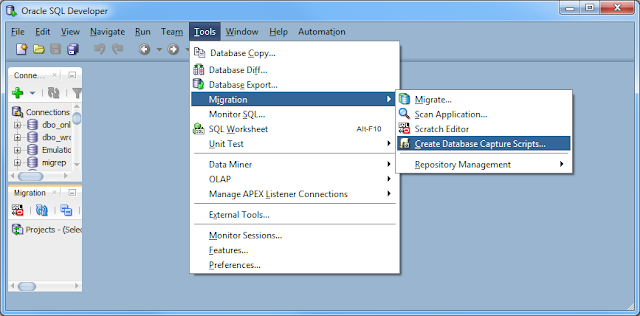
Sometimes its not possible to directly connect over JDBC to a database your want to migrate to Oracle. Sometimes you want someone else to perform the migration but would rather if you could just email them the metadata to carry out the migration without having them onsite. In these cases SQL Developer offers Offline Capture. Instead of making a connection to you database using a SQL Developer JDBC connection and then extracting the database metadata over the connection, you can run a script provided by SQL Developer which extracts the database metadata to files. These files can be used to perform the capture, making it easy to provide the database metadata to others without a connection. Script Creation The Offline Capture scripts can be acquired using SQL Developer. Tools > Migration > Create Database Capture Scripts ... Choose where you want to place the scripts, Windows or Linux format and which Platform ( SQL Server, MySQL, Sybase, DB2, Teradata) Runni...

Multibyte Offline Data Move

Image
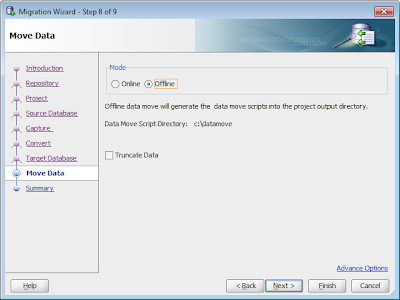
Moving data from a non Oracle database to Oracle can be a bit tricky when different character sets are at play. For this example Ill move data from a Russian (Cyrillic_General_CI_AS) SQL Server  database on windows  to UTF8 (AL32UTF8) Oracle  database on linux. SQL Server 2008 Cyrillic_General_CI_AS database CREATE TABLE multibyte1(col1 VARCHAR(10),col2 CHAR(10)); CREATE TABLE multibyte2(col2 NVARCHAR(10),col2 NCHAR(100)); INSERT INTO multibyte1 VALUES('фис','фис'); INSERT INTO multibyte2 VALUES('фис','фис'); SELECT * FROM multibyte1; SELECT * FROM multibyte2; SQL Developer can migrate the two tables to Oracle CREATE TABLE multibyte1(col1 VARCHAR2(10),col2 CHAR(10)); CREATE TABLE multibyte2(col2 NVARCHAR2(10),col2 NCHAR(100)); SQL Developer will also generate offline data move scripts which can perform the data move using SQL Servers BCP and Oracle SQL*Loader. There are two issues with the scripts generated by SQL Developer...

Cross Connection Query Issue

Image
Topic Discussion ( Re: Bug: Cross Connection Query not working in 3.1, 3.2.1 ) https://forums.oracle.com/forums/post!reply.jspa?messageID=1065008

DBMS_OUTPUT manipulation and filtering in SQL*Plus

Small script to filter and manipulate the DBMS_OUTPUT in PL/SQL from SQL*Plus CLEAR SCREEN; SET LONG 1000000000 ; SET SERVEROUTPUT ON; VARIABLE outputclob CLOB ; VARIABLE maxlines NUMBER; --set the max lines EXECUTE :maxlines :=10; DECLARE --array to save the output lines into outtab dbms_output.chararr; outstr VARCHAR2(255); BEGIN -- initialize the output clob dbms_lob.createtemporary (:outputclob, TRUE); -- add some lines to the output buffer, added some "special" lines to filter on dbms_output.put_line('special 1'); dbms_output.put_line('nothing special 2'); dbms_output.put_line('special 3'); dbms_output.put_line('nothing special 4'); dbms_output.put_line('special 5'); dbms_output.put_line('nothing special 6'); --get the output lines into the local array dbms_output.get_lines(outtab, :maxlines);--maxlines is changed here if there are fewer rows -- note that this string will not be par...

Migrate to Existing Oracle Users

Image
Problem By default, SQL Developer will migrate a Sybase, SQL Server ,... database to a brand new target user in Oracle. This new user is defined (CREATE USER ... ) at the start of the the generation script. For Sybase and SQL Server, we append the owner name to the database name (ex: dbo_Northwind) , to come up with a new Oracle target user name. This is done to create the same separation of objects. At the moment (SQL Developer 3.1) we define the password to be the same as the user name. Its always best to perform the generation phase "offline" so you can inspect the generation script first before it is run. Generation Script : Notice the CREATE USER .... In the above example I migrated the SQL Server Northwind database with default preferences. Default Preferences Solution If you wish to migrate to an existing Oracle User then there are two methods Least Privilege Schema Migration : Run the generation script directly into the chosen ...

Sybase and SQL Server Image Data Move

Image
SQL Developer can move data online and offline. Online is really only for small amounts of data (<100mb). For larger sets of data with greater performance and much better logging, the Offline Data Move feature should be used. SQL Developer will create two sets of scripts. One to dump out the data using Sybase/SQL Servers BCP tool to DAT files on the disk. The second set of scripts to read the DAT files and load the data into the Oracle tables using Oracle SQL*Loader. As the scripts are just plain text files they should be inspected and can be modified to suit your needs. Because SQL Developer knows the names of all the tables and each columns name/datatype it can do a good job of defining these scripts, so very little has to be modified. Currently there is an issue moving large Images from Sybase/SQL Server to Oracle using the offline data move scripts SQL Developer generate. But with a little change you can get them to move correctly. For this little test , the first thing is to In...