Posts

Multibyte Offline Data Move

Image
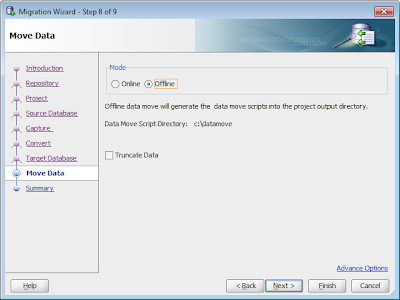
Moving data from a non Oracle database to Oracle can be a bit tricky when different character sets are at play. For this example Ill move data from a Russian (Cyrillic_General_CI_AS) SQL Server  database on windows  to UTF8 (AL32UTF8) Oracle  database on linux. SQL Server 2008 Cyrillic_General_CI_AS database CREATE TABLE multibyte1(col1 VARCHAR(10),col2 CHAR(10)); CREATE TABLE multibyte2(col2 NVARCHAR(10),col2 NCHAR(100)); INSERT INTO multibyte1 VALUES('фис','фис'); INSERT INTO multibyte2 VALUES('фис','фис'); SELECT * FROM multibyte1; SELECT * FROM multibyte2; SQL Developer can migrate the two tables to Oracle CREATE TABLE multibyte1(col1 VARCHAR2(10),col2 CHAR(10)); CREATE TABLE multibyte2(col2 NVARCHAR2(10),col2 NCHAR(100)); SQL Developer will also generate offline data move scripts which can perform the data move using SQL Servers BCP and Oracle SQL*Loader. There are two issues with the scripts generated by SQL Developer...

Cross Connection Query Issue

Image
Topic Discussion ( Re: Bug: Cross Connection Query not working in 3.1, 3.2.1 ) https://forums.oracle.com/forums/post!reply.jspa?messageID=1065008

DBMS_OUTPUT manipulation and filtering in SQL*Plus

Small script to filter and manipulate the DBMS_OUTPUT in PL/SQL from SQL*Plus CLEAR SCREEN; SET LONG 1000000000 ; SET SERVEROUTPUT ON; VARIABLE outputclob CLOB ; VARIABLE maxlines NUMBER; --set the max lines EXECUTE :maxlines :=10; DECLARE --array to save the output lines into outtab dbms_output.chararr; outstr VARCHAR2(255); BEGIN -- initialize the output clob dbms_lob.createtemporary (:outputclob, TRUE); -- add some lines to the output buffer, added some "special" lines to filter on dbms_output.put_line('special 1'); dbms_output.put_line('nothing special 2'); dbms_output.put_line('special 3'); dbms_output.put_line('nothing special 4'); dbms_output.put_line('special 5'); dbms_output.put_line('nothing special 6'); --get the output lines into the local array dbms_output.get_lines(outtab, :maxlines);--maxlines is changed here if there are fewer rows -- note that this string will not be par...

Migrate to Existing Oracle Users

Image
Problem By default, SQL Developer will migrate a Sybase, SQL Server ,... database to a brand new target user in Oracle. This new user is defined (CREATE USER ... ) at the start of the the generation script. For Sybase and SQL Server, we append the owner name to the database name (ex: dbo_Northwind) , to come up with a new Oracle target user name. This is done to create the same separation of objects. At the moment (SQL Developer 3.1) we define the password to be the same as the user name. Its always best to perform the generation phase "offline" so you can inspect the generation script first before it is run. Generation Script : Notice the CREATE USER .... In the above example I migrated the SQL Server Northwind database with default preferences. Default Preferences Solution If you wish to migrate to an existing Oracle User then there are two methods Least Privilege Schema Migration : Run the generation script directly into the chosen ...

Sybase and SQL Server Image Data Move

Image
SQL Developer can move data online and offline. Online is really only for small amounts of data (<100mb). For larger sets of data with greater performance and much better logging, the Offline Data Move feature should be used. SQL Developer will create two sets of scripts. One to dump out the data using Sybase/SQL Servers BCP tool to DAT files on the disk. The second set of scripts to read the DAT files and load the data into the Oracle tables using Oracle SQL*Loader. As the scripts are just plain text files they should be inspected and can be modified to suit your needs. Because SQL Developer knows the names of all the tables and each columns name/datatype it can do a good job of defining these scripts, so very little has to be modified. Currently there is an issue moving large Images from Sybase/SQL Server to Oracle using the offline data move scripts SQL Developer generate. But with a little change you can get them to move correctly. For this little test , the first thing is to In...

JDeveloper Group By Insight Preference

Image
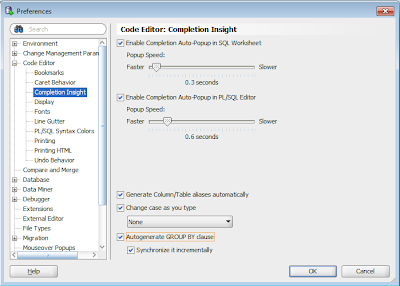
During Oracle OpenWorld a customer asked how to turn off the autogenerate of GROUP BY clause when using JDeveloper. SQL Developer has a preference But JDeveloper is missing this preference, and it is turned on by default. This will be rectified in a future realese of JDeveloper but in the mean time there is a workaround. 1) Close JDeveloper. 2) Open JDevelopers product-preferences.xml file. This can be found under c:\Users\ \AppData\Roaming\JDeveloper\ \o.jdeveloper\ on windows 7. Or in the usual place applications persist preferences in your OS. 3)Add the following after the ide tag. <hash n="DBConfig"> <value n="AUTOGENERATEGROUPBY" v="false"/> <hash n="EXTENSION"/> <value n="INDENT_CACHE_NUMBER" v="2"/> <value n="INDENT_CACHE_USE_TAB" v="false"/> </hash> . 4) Restart JDeveloper, and Autogenerate GROUP BY should not turned off.

Very Large Migrations

Image
Most of the time SQL Developer does a good job of migrating a database from SQL Server, Sybase ,... To Oracle. But there are some tricks to help make very large migrations perform smoother. This talks about Large migrations in terms of object numbers , not amount of data in tables. If your migrating 50 databases at once, and each has 1,000 tables, 1,000 views , 1,000 procedures . That is a lot of meta data to churn through and sometimes we find memory issues , open cursors ,... can be a problem. We are always working to reduce the amount of resources required to perform the migrations , but for the moment (SQL Dev 3.0) here are a few tricks which just might make the difference between the migration failing and the migration completing. Memory By Default SQL Developer startups with AddVMOption -XX:MaxPermSize=128M (found in sqldeveloper\sqldeveloper\bin\sqldeveloper.conf) AddVMOption -Xmx640M (found in sqldeveloper\ide\bin\ide.conf) AddVMOption -Xms128M (found in sqldev...