Posts

Migrate to Existing Oracle Users

Image
Problem By default, SQL Developer will migrate a Sybase, SQL Server ,... database to a brand new target user in Oracle. This new user is defined (CREATE USER ... ) at the start of the the generation script. For Sybase and SQL Server, we append the owner name to the database name (ex: dbo_Northwind) , to come up with a new Oracle target user name. This is done to create the same separation of objects. At the moment (SQL Developer 3.1) we define the password to be the same as the user name. Its always best to perform the generation phase "offline" so you can inspect the generation script first before it is run. Generation Script : Notice the CREATE USER .... In the above example I migrated the SQL Server Northwind database with default preferences. Default Preferences Solution If you wish to migrate to an existing Oracle User then there are two methods Least Privilege Schema Migration : Run the generation script directly into the chosen ...
Sybase and SQL Server Image Data Move

Image
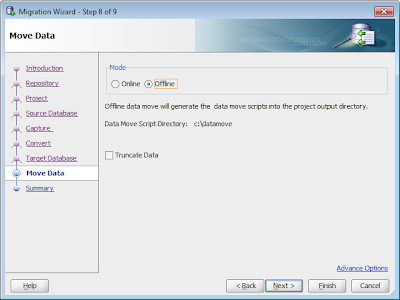
SQL Developer can move data online and offline. Online is really only for small amounts of data (<100mb). For larger sets of data with greater performance and much better logging, the Offline Data Move feature should be used. SQL Developer will create two sets of scripts. One to dump out the data using Sybase/SQL Servers BCP tool to DAT files on the disk. The second set of scripts to read the DAT files and load the data into the Oracle tables using Oracle SQL*Loader. As the scripts are just plain text files they should be inspected and can be modified to suit your needs. Because SQL Developer knows the names of all the tables and each columns name/datatype it can do a good job of defining these scripts, so very little has to be modified. Currently there is an issue moving large Images from Sybase/SQL Server to Oracle using the offline data move scripts SQL Developer generate. But with a little change you can get them to move correctly. For this little test , the first thing is to In...

JDeveloper Group By Insight Preference

Image
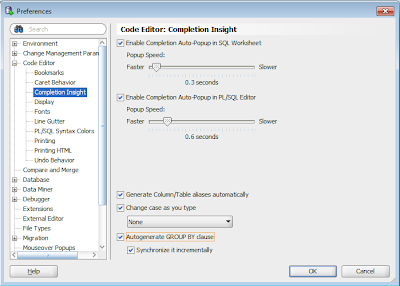
During Oracle OpenWorld a customer asked how to turn off the autogenerate of GROUP BY clause when using JDeveloper. SQL Developer has a preference But JDeveloper is missing this preference, and it is turned on by default. This will be rectified in a future realese of JDeveloper but in the mean time there is a workaround. 1) Close JDeveloper. 2) Open JDevelopers product-preferences.xml file. This can be found under c:\Users\ \AppData\Roaming\JDeveloper\ \o.jdeveloper\ on windows 7. Or in the usual place applications persist preferences in your OS. 3)Add the following after the ide tag. <hash n="DBConfig"> <value n="AUTOGENERATEGROUPBY" v="false"/> <hash n="EXTENSION"/> <value n="INDENT_CACHE_NUMBER" v="2"/> <value n="INDENT_CACHE_USE_TAB" v="false"/> </hash> . 4) Restart JDeveloper, and Autogenerate GROUP BY should not turned off.

Very Large Migrations

Image
Most of the time SQL Developer does a good job of migrating a database from SQL Server, Sybase ,... To Oracle. But there are some tricks to help make very large migrations perform smoother. This talks about Large migrations in terms of object numbers , not amount of data in tables. If your migrating 50 databases at once, and each has 1,000 tables, 1,000 views , 1,000 procedures . That is a lot of meta data to churn through and sometimes we find memory issues , open cursors ,... can be a problem. We are always working to reduce the amount of resources required to perform the migrations , but for the moment (SQL Dev 3.0) here are a few tricks which just might make the difference between the migration failing and the migration completing. Memory By Default SQL Developer startups with AddVMOption -XX:MaxPermSize=128M (found in sqldeveloper\sqldeveloper\bin\sqldeveloper.conf) AddVMOption -Xmx640M (found in sqldeveloper\ide\bin\ide.conf) AddVMOption -Xms128M (found in sqldev...

Empty Space and Single Space Data Move

Empty Space strings, that is Strings with no text whats so ever '', are treated differently by different databases. Oracle treats an empty string '' as NULL Sybase treats an empty string '' as a single spaced string ' ' Some other database support empty strings In the migration preferences you can decide how to handle empty strings. You can either migrate them to 1) ' ' A single space. or 2) NULL (which is how Oracle would interpret an empty string anyway) There is one other thing to note. JTDS 1.2 (the recommended JDBC driver for Sybase and SQL Server) returns an empty string even when the data in the Sybase or SQL Server database is a single space. This is a bug in JTDS, but it should be noted that if you keep the default option of migrating empty strings to a single space, you should see no issue.

FLOAT data type migration

Sybase FLOAT is generally used to save non integer numbers like fractions where no number of precision can hold the exact value. Sybase FLOATs do not store an exact value "It stores slightly imprecise representations of real numbers as binary fractions at the hardware level" http://www.sybase.com/detail?id=20313 Oracle has two data types, FLOAT and BINARY_FLOAT. http://stackoverflow.com/questions/332492/oracle-floats-vs-number FLOAT is really a decimal data type with exact values (basically it is a NUMERIC) BINARY_FLOAT is a binary data type which better maps to Sybase FLOAT data type If you migrate from Sybase FLOAT to Oracle FLOAT any value inserted will be treated as a specific explicit numeric, which will not behave like Sybase FLOAT. If you migrate from Sybase FLOAT to Oracle BINARY_FLOAT then any value inserted will be treated as a binary imprecise number, just like Sybase. SYBASE drop table testfloat go create table testfloat (floatcol float) go ins...

Migration Reports 3.0

Image
We have revamped the migration reports in SQL Developer 3.0 to provide significantly more information about your migration. Instead of "hiding" this information under the Migration Report navigator , now the reports can be viewed by double clicking on any of the folder nodes in the Migration navigator. The reports are smart enough to tailor the information depending on where in the Migration Navigator you click. Status Gives you a heads up of the status of each migration project/model. Also provides links which when double clicked, launch the migration wizard to perform the appropriate action Summary Provides the number of objects (tables, procedures, views , ... ) involved in each of the migration projects.It then breaks down into the number of objects in each database or owner. Analysis Provides fine grain details about the databases and objects being migrated. SQL Size Chart Visualize size of all SQL Objects SQL Size Summary Number of SQL Objects with similar sizes ...