Posts

JWT Profile : Validating JWT Access Tokens In ORDS

Image
ORDS 23.3.0 brings a new way of accessing protected resources using JSON Web Tokens (JWT). Making it much easier to integrate ORDS with OAuth2-compliant Identity Providers such as  Oracle Identity Cloud Service (IDCS) Oracle Identity Access Management (IAM) Microsoft Azure Active Directory  Okta OAuth0  JWT access tokens issued by Identity Providers on behalf of a user/resource owner, allow a client to access the users protected resources in ORDS. ORDS provides a new feature called JWT Profile, which defines how JWT bearer tokens can be validated for a particular REST-Enabled schema. Example JWT Profile JWTs presented as Bearer Tokens for protected resources for a particular REST-Enabled schema have to be Signed with a signature which can be validated using the schemas JWT Profile p_jwk_url Provide an audience "aud" claim which matches the schemas  JWT ...
SQLcl Alias Example For Dropping Multiple Objects.

Image
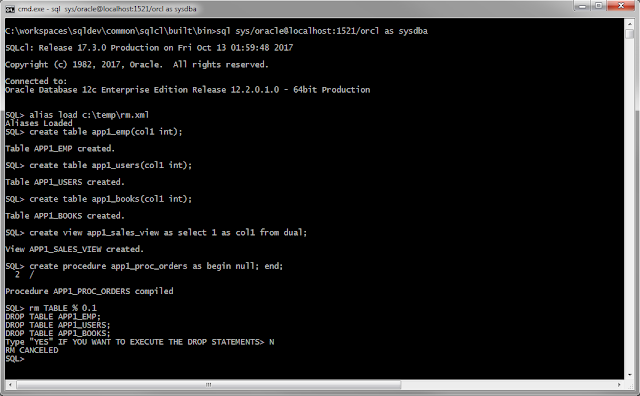
SQLcl allows you to define "named" scripts or statements using the ALIAS command.  Jeff has a neat example on his blog . I created the following alias to make it really easy to destroy a database!  drop objects. RM Alias Dropping tables, views, procedures is a daily occurrence for database developers. The following SQLcl ALIAS may come in handy when you want to drop lots of objects at the same time. Just specify the object_type : TABLE, VIEW, PROCEDURE, .... object_name: Using a  LIKE expression.  Example: MY%  created: Number of days. Example: 1 A script is written with all the objects listed. The list of objects can be reviewed and an option to execute the script or cancel without dropping anything is provided. Needless to say you can do a lot of damage dropping database objects and this makes it very easy to do so. So use at your own risk! Best to grab the alias code below and see if you can tweak it to suit yourself. Test Env create t...

A REST Enabled SQL View!

Image
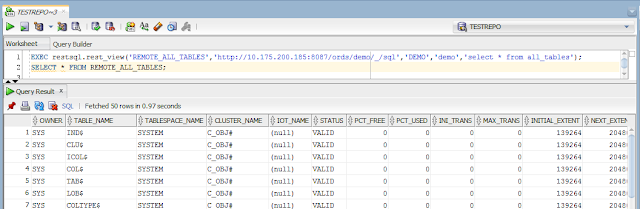
I put together a small Oracle PL/SQL package which demonstrates how to access REST Enabled SQL service and standard REST end points through PL/SQL and SQL. It can also dynamically create an Oracle Database View to access information from a REST Enabled SQL request. This view can be referenced in SQL just like any other view but the data is provided from the REST Enabled SQL service which could be running against another database. Maybe an alternative to Oracle database links? Examples using RESTSQL package restsql.pks restsql.pkb Setup HTTP access in Oracle 12c: You may need to setup HTTP access in your database. Heres how I went about providing access to my Oracle user TESTREPO Example of a view automatically created by restsql.rest_view: EXEC restsql.rest_view('REMOTE_ALL_TABLES','http://10.175.200.185:8087/ords/demo/_/sql','DEMO','demo','select * from all_tables'); Limitations : The view is limited to the ...

Getting Started with REST Enabled SQL

Image
POST a query or DML or DDL or even a short script over HTTPS to ORDS and have ORDS run that on your Oracle Database and have the results returned in JSON. That's the plan. What You Need To Know REST Enabled SQL uses Schema Authentication as well First Party Authentication.   This means you can run SQL against an Oracle Database if the following is true. REST Enabled SQL is enabled in ORDS A database user is REST Enabled  The database user name is known The database user password is known So before turning on REST Enabled SQL in ORDS it is vital that current REST Enabled schemas have strong, secure passwords. This should be resolved before turning on REST Enabled SQL in ORDS, as once it is turned on, all REST Enabled schemas will be accessible using only their database username and password through ORDS. The same applies for any new REST Enabled schemas. Setup Requirements Download ORDS 17.3. Download cURL  . Not necessary, but the exampl...

New! REST Enabled SQL for ORDS

Image
The Oracle REST Data Service provides REST access to your Oracle Database. Tables, predefined queries and PL/SQL blocks can be exposed as RESTful services. This is great when you can foresee what table, query or action you wish to REST enable. Starting in ORDS 17.3 you can now POST the query, pl/sql or sql*plus statement to ORDS at run time. This new feature is call REST Enabled SQL and it is built into ORDS as standard. It allows you to define the query or statement you want to run without having to create a predefined RESTFul service. Download http://www.oracle.com/technetwork/developer-tools/rest-data-services/downloads/ords-beta-173-3873522.html REST Enabled SQL provides a HTTPS POST API that your HTTP client (web browser, java application, ...) can access just like other ORDS services. Just POST the SQL statement you wish to run to the REST Enabled SQL endpoint and the results will be returned in JSON. Example Web Form A HTML form POSTs to the REST Enabled SQL endp...

Temporarily Disable a Generated Always As Identity Column

Oracle Database 12c allows you to define a column to be an IDENTITY column. It can be either  GENERATED ALWAYS or BY DEFAULT. A GENERATED ALWAYS AS IDENTITY column does not allow you to INSERT a value for it. When it comes to moving data from one table to another and this type of column is present, there are a few steps to "disable" the GENERATED ALWAYS AS IDENTITY column and after the data move "enable" it. set echo on drop table test_identity; create table test_identity(id number generated always as identity); --This insert will fail as the column is generated always --and it does not accept values insert into test_identity(id) values(1); --Change the identity column to generated by default. --This will allow us to insert our values alter table test_identity modify id generated by default as identity; --This insert works. as will Copy to Oracle insert into test_identity(id) values(1); select * from test_identity; --Change the identity column back to...

SQLcl Aliases & The Invisible Column Trick

Image
SQLcl is the bee's knees. Problem Today I had a common problem. I wanted to reposition a column within a table. "Oh you should use views!"  "Never reference a table directly!"  "Column position should be meaningless!" I hear you shout. Yes but, look at this table definition. PERSON table FIRSTNAME ,ADDRESS,PHONE, LASTNAME Doesn't that drive you mad.  I want the order FIRSTNAME, LASTNAME , ADDRESS, PHONE Or worse. You decide to add a new column  (middlename) to your table definition script. create table person (firstname varchar2(100),                             middlename varchar2(100),                                  lastname varchar2(100),                              ...

Migrating To Oracle Using Custom Object Names

Image
Sybase , SQL  Server and other databases allow for long identifier names. Oracle allows for a maximum of 30 Bytes when naming objects like  users, tables, ... When it comes to migrating objects to Oracle,  SQL Developer will truncate the object names and resolve clashes with unique names. Say for example you have two tables called Application_Name_SubArea_Name_SpecificAreaName_Table_Table1 Application_Name_SubArea_Name_SpecificAreaName_Table_Table2 Oracle SQL Developer will convert these to Application_Name_SubArea_Name_S Application_Name_SubArea_Name_1 This default new name may not be to your liking, so SQL Developer has an easy way of changing this mapping. First perform the Capture and Convert phases. You do not need to perform all the phases of a migration as the migration wizard allows you to stop and start a migration at many points. In this case click "Finish" on the Convert page of the migration wizard. Once the capture and conve...

Oracle 12c Implicit Result Sets in SQL Developer 4.1

Image
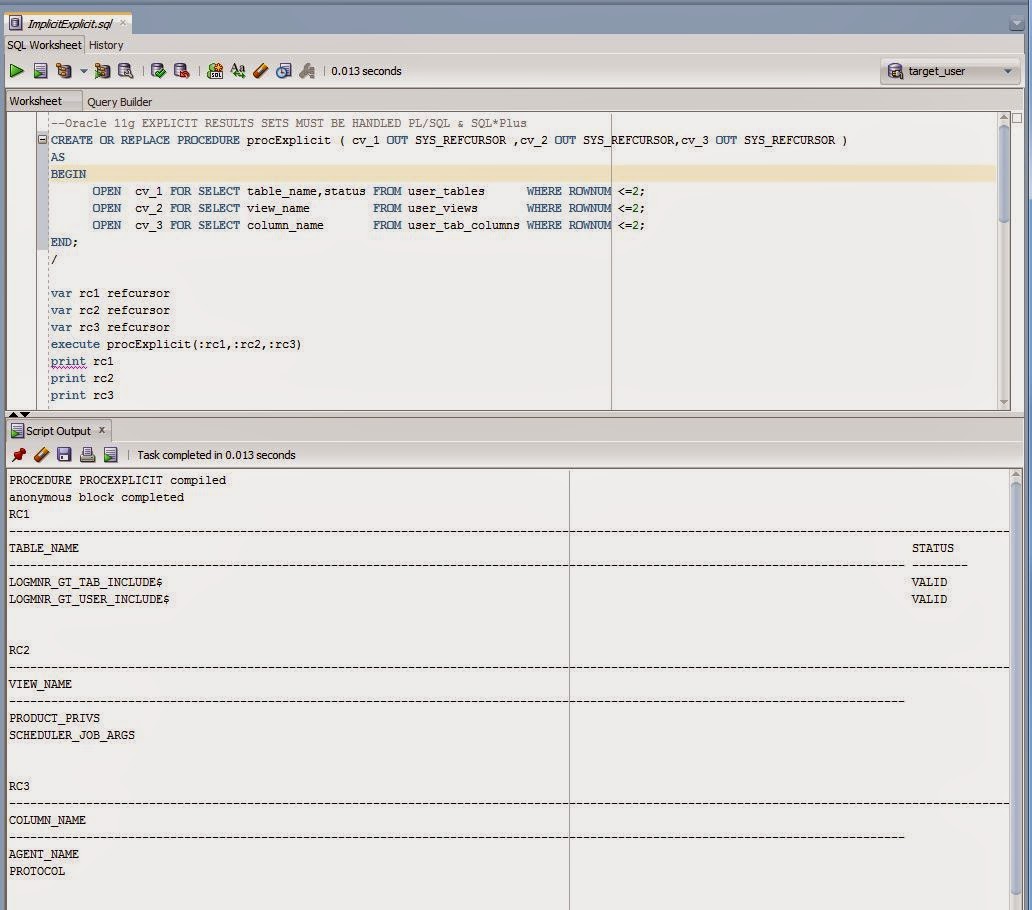
Ever want to run a Stored Procedure or a PL/SQL anonymous block and just want to "print out" the results of a query ?  Even as a little bit of debug information? In Oracle 11g you have to create a SQL*Plus REFCURSOR variable and then bind it within the anonymous block  or  pass it as an argument to a procedure/function. Run the code and then print the refcursor. This requires a bit of know how in SQL*Plus and how it will work with your PL/SQL block or procedure. In Oracle 12c a new feature called IMPLICIT RESULT SETS allows you to pass back a result set without parameters or external binds. When calling from SQL*Plus or SQL Developer Worksheet , this means we do not have to create REFCURSOR variables. It was initially developed to help migrating from Sybase and SQL Server to Oracle. But its a nice feature which may help you in your day to day. Explicit Result Sets in 11g  Implicit Result Sets in 12c In Oracle 12c the cursor is defined as variable n...

T-SQL v PL/SQL

Image
How to Migrate T-SQL to Oracle PL/SQL Oracle SQL Developer available for free on OTN provides a Migrate to Oracle feature. Migrate to Oracle helps automate the task of migrating a SQL Server or Sybase database, their  tables, data and their T-SQL objects (Views, Triggers, Functions, Procedures) to a corresponding Oracle database and PL/SQL Objects. T-SQL v PL/SQL Both are procedural languages which provide standard programming language features like control flow, variables, conditions and support embedded DML SQL (INSERT,UPDATE,DELETE,SELECT) statements. Many of the structures found in T-SQL have a one to one mapping to similar structures in PL/SQL. Sometimes there are differences in syntax and features. Using SQL Developers Scratch Editor, T-SQL can be automatically converted to the corresponding Oracle PL/SQL. Typically procedures are migrated using the Migrate to Oracle feature, but the Scratch Editor provides a neat editor to type T-SQL on the left hand pane and have...

Inspecting a Temporary Table or Uncommitted Table rows in a Debug Session

Image
Debugging a procedure using SQL Developer is really neat. But I ran into an issue whereby I wanted to inspect the rows of a temporary table while I was debugging a stored procedure. I was unable to browse and inspect the rows in the temporary table as the debug session is on a different session. I had to throw in some debug code into the procedure to see something useful in the debug data tab. I ended up with the little procedure below which you may find useful. Basically I query the table in question and place the result in a CLOB to view in the debug window. 1) Create this procedure in your schema --COMPILE THIS WITH DEBUG AND STEP INTO IT IF YOU WISH TO SEE RUN TIME VALUES CREATE OR REPLACE PROCEDURE DEBUGINFO(p_tablename VARCHAR2,p_numrowstoinspect NUMBER DEFAULT 10) AS v_count INT; v_qryCtx DBMS_XMLGEN.ctxHandle; v_result CLOB; BEGIN EXECUTE IMMEDIATE 'SELECT COUNT(*) INTO :v_count FROM '||p_tablename INTO v_count; DBMS_OUTPUT.PUT_LINE('tablename='||...

Offline Capture

Image
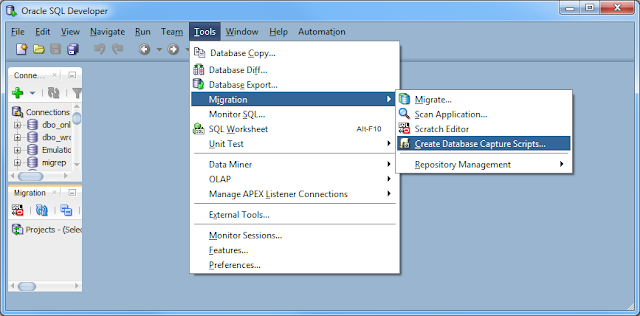
Sometimes its not possible to directly connect over JDBC to a database your want to migrate to Oracle. Sometimes you want someone else to perform the migration but would rather if you could just email them the metadata to carry out the migration without having them onsite. In these cases SQL Developer offers Offline Capture. Instead of making a connection to you database using a SQL Developer JDBC connection and then extracting the database metadata over the connection, you can run a script provided by SQL Developer which extracts the database metadata to files. These files can be used to perform the capture, making it easy to provide the database metadata to others without a connection. Script Creation The Offline Capture scripts can be acquired using SQL Developer. Tools > Migration > Create Database Capture Scripts ... Choose where you want to place the scripts, Windows or Linux format and which Platform ( SQL Server, MySQL, Sybase, DB2, Teradata) Runni...

Multibyte Offline Data Move

Image
Moving data from a non Oracle database to Oracle can be a bit tricky when different character sets are at play. For this example Ill move data from a Russian (Cyrillic_General_CI_AS) SQL Server  database on windows  to UTF8 (AL32UTF8) Oracle  database on linux. SQL Server 2008 Cyrillic_General_CI_AS database CREATE TABLE multibyte1(col1 VARCHAR(10),col2 CHAR(10)); CREATE TABLE multibyte2(col2 NVARCHAR(10),col2 NCHAR(100)); INSERT INTO multibyte1 VALUES('фис','фис'); INSERT INTO multibyte2 VALUES('фис','фис'); SELECT * FROM multibyte1; SELECT * FROM multibyte2; SQL Developer can migrate the two tables to Oracle CREATE TABLE multibyte1(col1 VARCHAR2(10),col2 CHAR(10)); CREATE TABLE multibyte2(col2 NVARCHAR2(10),col2 NCHAR(100)); SQL Developer will also generate offline data move scripts which can perform the data move using SQL Servers BCP and Oracle SQL*Loader. There are two issues with the scripts generated by SQL Developer...